We’ve added three new features to Subtrak to help you build, organize, and share your company’s best practices.
Whether you’re mapping out how a project should run, documenting completed work, or defining your company’s reporting structure, these updates give you more ways to build and use your company’s Playbook.
1. PDF exports: Take your processes beyond Subtrak
You can now export any process or task from your Playbook, Projects, or Operations as a PDF, with the flexibility to choose exactly what information to include.
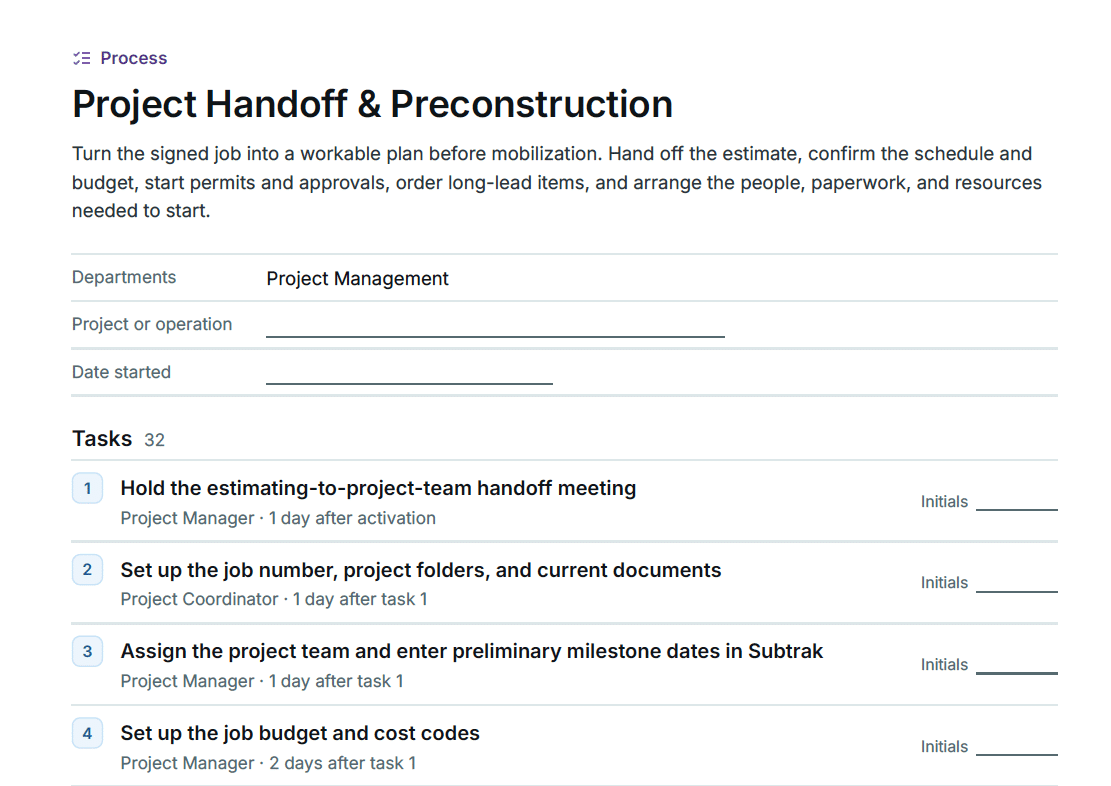
Sometimes you need to share a checklist, job record, or set of instructions with someone outside Subtrak. If you want to provide a record of completed work or instructions for someone in the field, having a printable copy is incredibly useful.
With PDF exports, you can:
- Document completed work: Export processes with completion dates, task statuses, notes, and photos to maintain records for compliance, quality control, or project closeout.
- Share progress with clients: Share a record of completed work with owners, GCs, or anyone else involved in the job.
- Create paper checklists: Print processes with checkboxes and initials fields so your crews can complete them by hand.
- Share instructions: Export processes with their how-to guides for employees, subcontractors, or anyone else who needs them.
You can customize each export to include how-tos, progress, completion evidence, or fields for handwritten checklists.
All PDFs are also saved in your personal Exports page for 30 days, so you can easily download them again.
2. Flowchart view: A more visual way to build your processes
Not everyone thinks in lists. Sometimes, the best way to understand a process is to see how everything connects.
That’s why we’ve introduced a Flowchart view for processes in your Playbook.
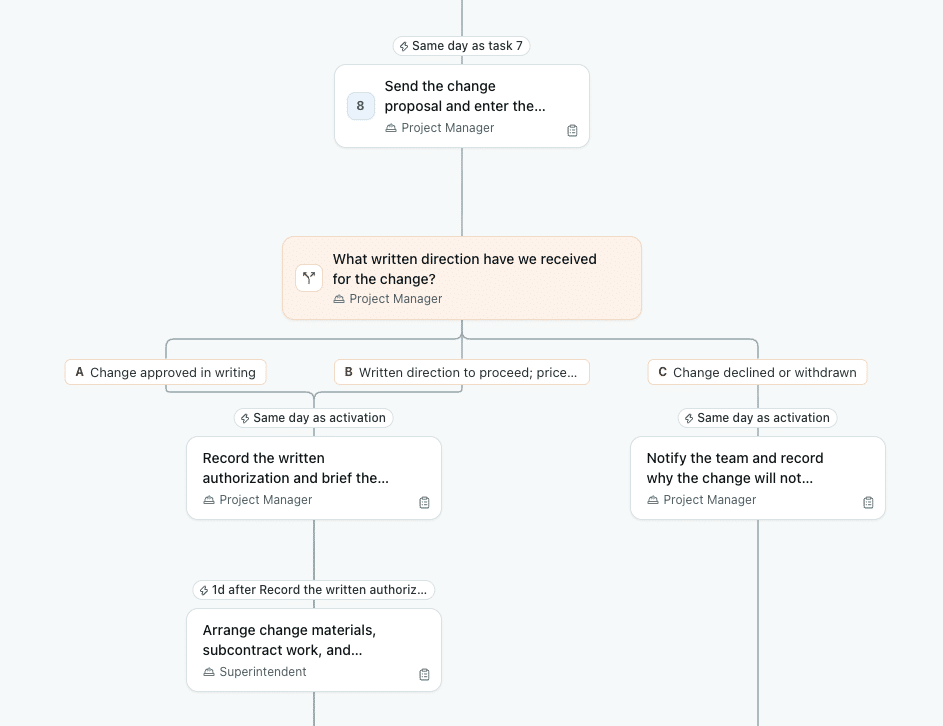
You can now switch between List and Flow views to see your processes as visual diagrams, including tasks, decision points, and the different paths a process can take.
And it’s not just for viewing. You can build and edit processes directly from the flowchart by adding tasks, creating decisions, and rearranging the order of work.
We’ve also brought Flow view to Project templates.
This gives you a visual overview of how your projects are structured, from startup through closeout. You can see project phases, which processes happen in parallel, and which processes depend on others being completed first.
This makes it easier to spot missing steps, create a consistent way to run jobs, and help visual learners understand how your company does things.
3. Org charts: Bring your company structure into your Playbook
Your Playbook shouldn’t just explain how work gets done. It should also help your team understand who’s responsible for what.
We’ve added a new Org chart view to the Roles section of your Playbook.
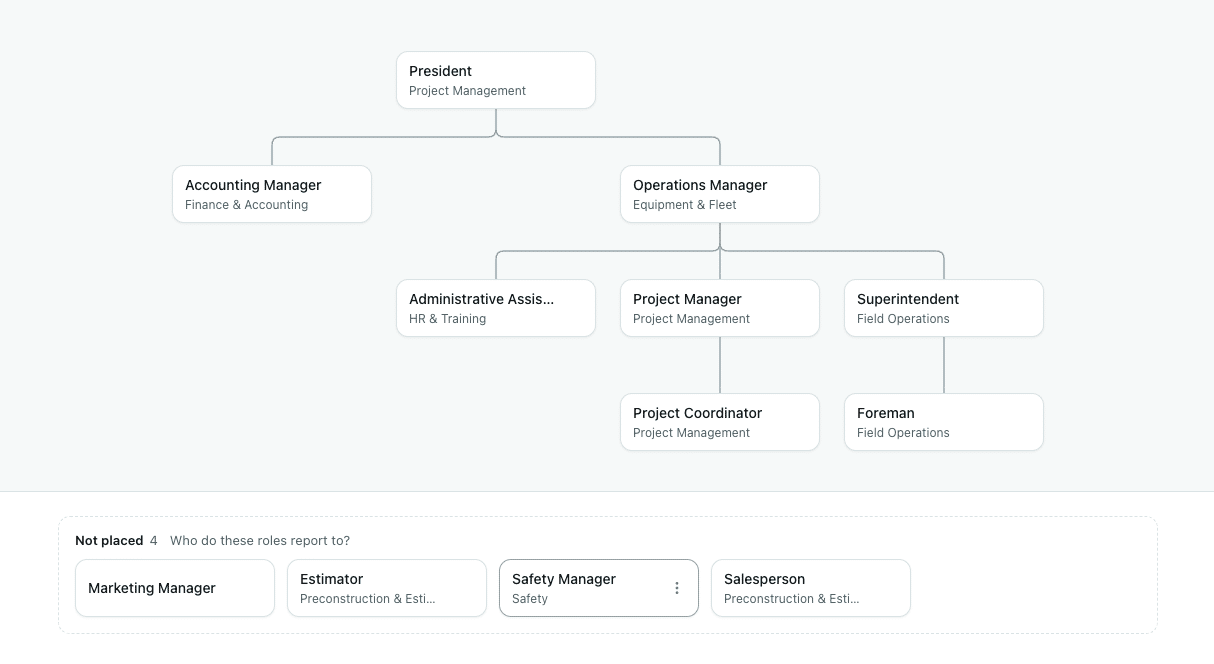
You can now define which roles report to others and visualize your company’s reporting structure in an interactive organizational chart.
You can also add new roles and rearrange reporting relationships directly from the chart.
This is another step toward making Subtrak a central place for documenting not just your processes, but how your company operates as a whole.
What’s next?
We’re continuing to make Subtrak a better place to document, organize, and share your company’s best practices.
Over the coming weeks, we’ll be improving how processes, tasks, and policies are displayed in your Playbook. Our goal is to make it easier for you to keep your documentation up to date and for your team to find the information they need.
We’re also looking at ways to give contractors more flexibility in how they build processes and plan their projects.
As always, we’d love to hear what you think. Your feedback helps us continue building Subtrak into the best tool for capturing the way contractors run their businesses.